Stale inventory report for overstock parts.
Jump to a specific section by clicking a link
Overview | Samples | Variables | Alert Functionality | Best Practices & Tips | Related Alerts
Overview
Overview
Overstock Parts Network, a division of BEI Services, will buy back your stale inventory. This alert - similar to ID75 - emails a .csv list of stale parts based on your chosen parameters, formatted for easy import and pricing by OPN. This helps them provide quotes faster.
By default, the report runs monthly, but you can have it run quarterly instead. The alert can be sent directly to your parts contact, so they can reply directly with a quote. The report is also compatible with OEM Connect (www.oemconnect.com)
Run Schedule: Monthly on the 24th
Type of Output: Email
* * *
Sample
Sample
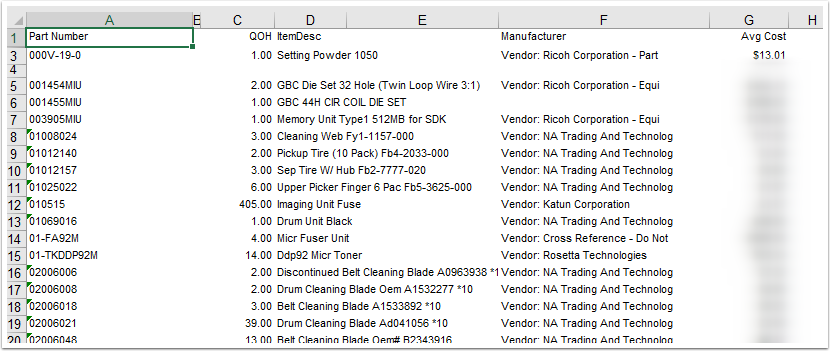
* * *
Variables
Variables
Variable W: Item Category Code(s) - List the inventory codes for the report to use; separate multiple codes with commas. Leave blank to use Variable Z for the category codes. More details on this variable here.
Variable X: Cost Exceeding - Enter the dollar amount (whole numbers only) for the cost of the part to exceed to show on the report.
Variable Y: No usage in YYY Days from Today - Enter the number of days for the item to have no usage to be considered stale.
Variable Z: Alternative Category Code(s) - An alternative to Variable W, use this variable to select items based upon the assigned Service Code categories of P or S. More details on this variable here.
Variable 1: Warehouse Number(s) for QOH - Enter the warehouse numbers to check for a quantity on hand. Leave blank to check all warehouses.
Variable 2: Warehouse Number(s) for Usage - Enter the warehouse numbers to check for usage. Leave blank to check all warehouses.
* * *
Alert Functionality
Alert Functionality
1. ID335 is hard-coded to not consider any Item created in the last 550 days.
2. The report will NOT report on both Item Category (Variable W) and ServiceCodeCategory (Variable Z). Leave Variable W blank to report on the Service Code Category listed in Variable Z, or leave Variable Z blank to report on the Item Category listed in Variable W.
Var W
Variable W Item Category:
When Variable W is not blank, the process will check for all parts with the item categories specified in the variable.
Item categories are found in e-automate in Tools - Lists and Codes - Item Categories:
Var Z
Variable Z Service Code Category:
You can enter either P or S into Variable Z. 'P' will report on all parts with a service code that has the service code category of P for parts, and entering 'S' will trigger on all items with a service code category of S for supplies. In order to use this variable, Variable W must be blank.
3. To limit the report to specific warehouses, enter the warehouse numbers in Variables 1 and 2. The warehouses are found in Inventory - Warehouses.
* * *
Best Practices & Tips
Best Practices & Tips
1. See here for documentation on best practices for managing dead inventory.
* * *
Related Alerts
Related Alerts
ID75 - Stale Inventory Report
* * *
0 Comments