Alert to email a PDF of service call details on ship in equipment to the originating dealer.
Jump to a specific section by clicking a link
Overview | Samples | Variables | Alert Functionality | Best Practices & Tips | Related Alerts
Overview
Overview
Alert ID764 and ID471 are very similar in setup; the difference in the alerts is with the attachment sent with the email to the dealer contact. ID764 sends a more detailed service call report. ID471 sends a copy of the service invoice with the call details. It's recommended to use one alert or the other, but not both.
This alert identifies recently closed service calls for equipment that are marked as 'Ship Ins' on the equipment record and sends the call details to the originating dealer. There are a few requirements to use this alert; the first is that the originating dealer must be set up as a customer record in e-automate, with the contact at the dealership set in a custom property. The contact set in the custom property is the contact that will be sent the call details. The equipment record needs to have a separate custom property set up to specify the ship in dealership.
Run Schedule: Hourly
Type of Output: Email
* * *
Sample
Sample
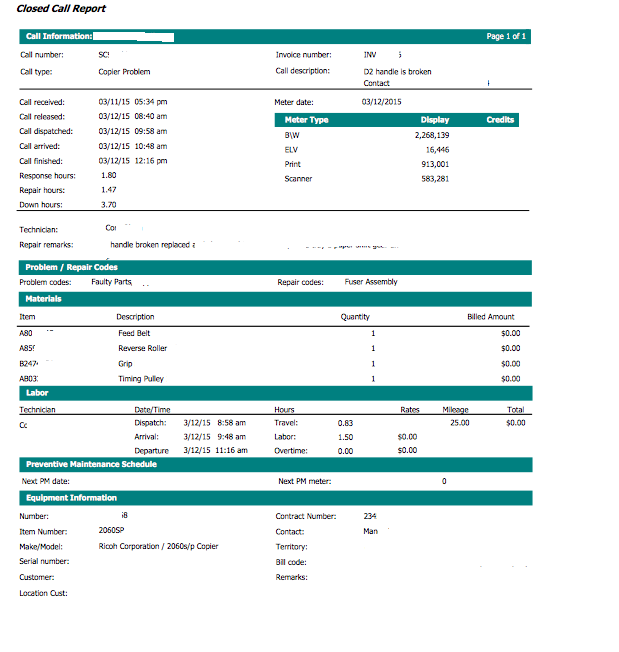
* * *
Variables
Variables
Variable W: Custom Property - Equipment - Name of the custom property on the equipment record to identify the ship in dealership for the equipment.
Variable X: Custom Property - Dealer Contact - Name of the custom property to set the dealer contact who will receive the call details. This custom property is set on the customer record.
* * *
Alert Functionality
Alert Functionality
This alert sends details of service calls for equipment 'ship ins' to the originating dealership.
1. To mark the equipment as a ship in, first, the dealership that you are servicing the equipment for must be set up as a customer in e-automate, and the dealer contact set in a custom property:
The contact set on the customer record ZCJShipInDlrAlertContact will receive the call details from ID764. The contact selected must have an email set on the contact record, or the alert will not work.
2. On the equipment record, the ZCJShipInDealer custom property needs to be set with the originating dealership:
The equipment record must have this custom property populated with a valid customer name for the alert to work.
* * *
Best Practices & Tips
Best Practices & Tips
1. This alert initially installs in test mode, as part of the install CEO Juice will create the needed custom properties.
Custom Property Set Up
Custom Property Set Up
Attribute name = ZCJShipInDealer
Description = Ship In Dealer
Data type = Lookup (Customers)
Attribute name = ZCJShipInDlrAlertContact
Description = Contact at ShipInDealer to notify on service calls and meters
Data type = Lookup (Contacts)
* * *
Related Alerts
Related Alerts
ID195 - ITT Equipment Changes
ID471 - Send Closed Call Ticket Information with Parts Details to Ship In Dealer
ID594 - Sales/Service Message for ITT Ship Out Equipment
* * *
0 Comments