Process to update technician's minimum stock levels based on the BEI TechOptimization report.
Jump to a specific section by clicking a link
Overview | Samples | Variables | Alert Functionality | Best Practices & Tips | Related Alerts
Overview
Overview
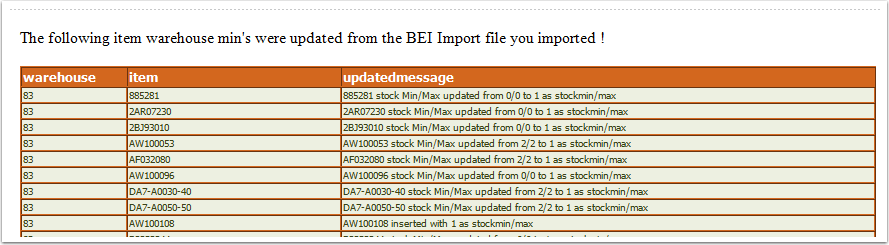
BEI subscribers who are using the BEI Territory Mapping Tool can download a CSV file that suggests the optimal car stock for a technician based on their MIF and national usage levels for those machines. This process takes the data from BEI and updates the minimum stocking levels for the technicians' warehouses in e-automate. The subscribers to the alert will receive a report showing the records updated/inserted, along with the previous minimum and the new minimum. You can also enable an email of all tech warehouses on the first weekday of the month showing the last time this process updated the minimum and the last time a physical count sheet was posted by setting Variable W to 'Enable'.
Run Schedule: Every 30 minutes
Type of Output: Email
* * *
Sample
Sample
* * *
Variables
Variables
Variable W: Monthly Report - Enter 'Enable' to receive a monthly report of tech warehouses showing the last time this event updated the minimum and the last time the warehouse had a physical count sheet posted. Enter 'Disable' to not receive the monthly report.
* * *
Alert Functionality
Alert Functionality
This process is updating the warehouse minimum settings on the item record for each technician:
**The spreadsheet used to push the records to the CEO Juice table is located at the bottom of this post.**
1. To utilize the BEI Predictive Car Stock, you must use the BEI Territory Mapping Tool (the mapping tool currently works best from the Chrome Browser).
Log in to BEI:
- Territory Mapping (under reports)
- Select their pre-determined Work Area (click NEXT, then SUBMIT)
- Now under Reports
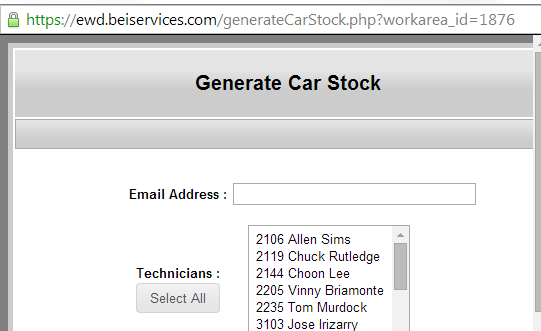
- Generate Car Stock
- Input your email address and select one or more technicians
- The report is emailed with an attached file (.csv)
Within 5 minutes or so, BEI will email a link where you can retrieve the ZIP file.
**FYI, the zip file name does not match the file name inside.
You will receive the zip file containing a .csv file for each technician requested. You should open each file in Excel and review BEI’s suggested car stock. They are working with data, but like most optimization tools, it is not infallible, and you should make any changes that you feel do not make sense. A pair of eyes on any report information (BEI, Juice, DGI, Compass, etc.) is worth 10,000 lines of programming code.
2. Once you make any changes/deletions/adjustments:
- Highlight and ‘copy’ all the rows of data from that spreadsheet in columns A thru C
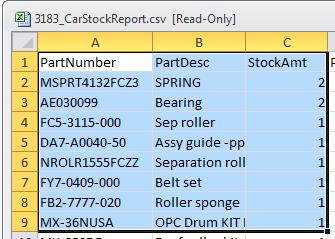
- Open the CEOJuice_BEI_TechMinUpdate revxxx.xlsm spreadsheet and on the worksheet tab 'BEITechMins', paste the contents starting at Column E [PartNumber] through G [StockAmt]. The spreadsheet is attached at the bottom of this post.

- In the Warehouse column, you’ll need to enter the warehouse number from e-automate that you want to update, making sure that you copy that warehouse number into column D for all the rows that have BEI data in them.
3. Once the data has been pasted into the spreadsheet, go to the [Settings] tab and enter 'CEOJuice' in the Company DB Name and the name of the e-automate SQL server name in Server.

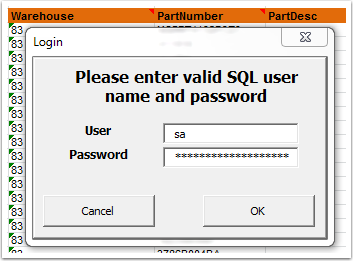
4. Return to the BEITechMins tab and press the 'Insert' button. At this point, you will be prompted for a user ID and password for the SQL server.
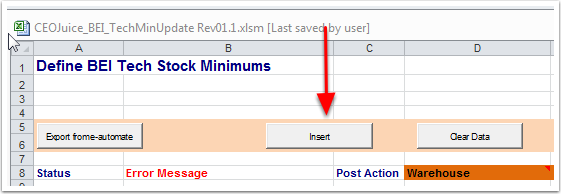
5. Once you have entered your user ID and password, press ‘OK’ and if your login is valid for SQL Server, the spreadsheet will process the data into our CEOJuice database table so that it can be processed by ID867 (this process runs on whatever schedule you specified - hourly, daily, etc.) and you will not see any changes to your technicians' minimum car stock levels until the task has run and the recipients specified in the subscriptions have received the email report with the results).
6. You should see ‘Posted’ in the Status column for all rows, which means the data was written into our CEO Juice temporary table.
7. Once the alert runs, the minimums will be updated in e-automate, and the subscribers to the alert will receive an email listing the changes made.
* * *
Best Practices & Tips
Best Practices & Tips
1. See this post for best practices on setting up a technician's carstock.
* * *
Related Alerts
Related Alerts
ID633 - BEI (Nexera) Callback Criteria
ID872 - Technician Overstock Report
* * *
0 Comments